Updates
Printer Buddy is made of parts that update separately:
| Part | What it is |
|---|---|
| Printer Buddy | The core app |
| Interface | The web pages |
| Notifications | Alerts to ntfy, Discord, Telegram, Pushover and email |
| Timelapse | Timelapse recording |
| Camera streamer | Shows off when it isn't used; its menu turns it on |
| AI model | Shows off when AI isn't on; its menu turns it on |
The Updates list
Open ☰ on the home page and scroll to Updates. Each part shows the installed version and, if there's a newer one, what it updates to. Under Printers you'll also find each printer's own updates (Klipper, Moonraker, Fluidd…) from its Moonraker update manager.
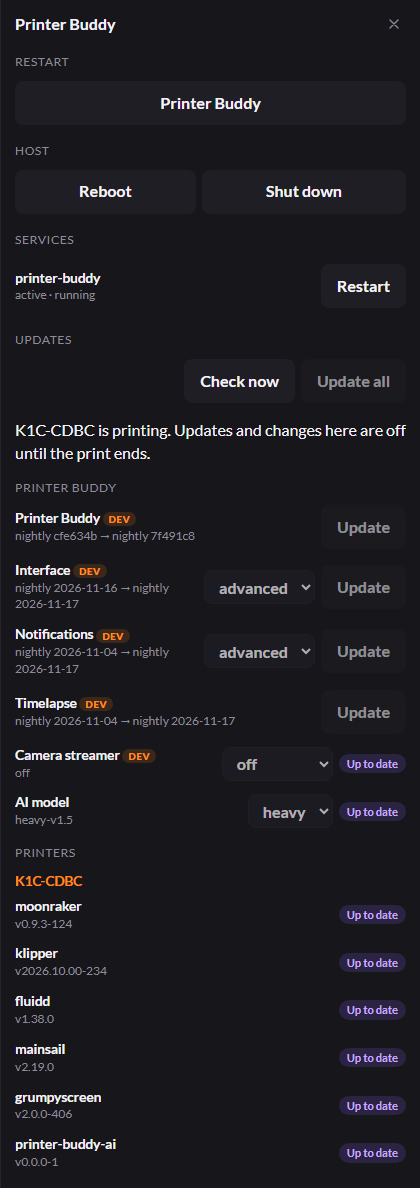
Update and Update all
Update on a row updates that part; Update all does everything. Printer Buddy restarts when it's done and the page reloads by itself (a Camera streamer update only restarts the streamer). Prints on the printers keep going.
While any printer is printing or paused, Update, Update all, the tier menus and Dev/beta builds are switched off, because the restart would lose that print's timelapse. They come back when the print ends.
Tier menus (Notifications, Camera streamer and AI model) switch that part and download it straight away.
Stable and nightly
- stable — tested releases with version numbers (like v1.2.5).
- nightly — built from the newest code; may have bugs.
Stable is the default. Put a single part on nightly with Dev/beta builds.
Waiting
Sometimes a new version of a part needs a newer version of another part first. Its row then says needs … first and shows Waiting instead of Update. Update the part it names, and it'll be offered after.
From the terminal
Or run ./install.sh and pick 3) Update. The installer's Update also refreshes things the app can't do on its own (like Printer Buddy's root helper), so run it once if an update tells you to.