☰ drawers
The ☰ button at the right of the top bar opens a drawer from the right. Click outside it, press Esc or × to close it. Restarts, stopping a service, reboot, shut down and turning a power device off ask first, and on a printer page they also warn you if that printer is printing. Starting a service or turning a power device on happens straight away (on a printer page, starting a service asks first if it's printing).
On a printer page
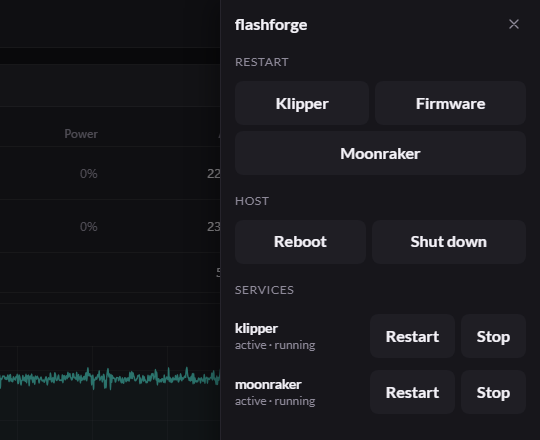
For that printer:
- Restart — Klipper, Firmware (MCU reset), Moonraker.
- Host — Reboot or Shut down the printer's host.
- Power — Moonraker power devices (only if the printer has any set up).
- Services — every service Moonraker lists (Klipper, Moonraker…) with its state, Restart and Start/Stop.
On the home page
For Printer Buddy's host (a printer or a dedicated host):
- Restart — Printer Buddy. Prints keep going on the printers; the page reloads when it's back.
- Host — Reboot or Shut down Printer Buddy's host.
- Services —
printer-buddy(Restart only), andprinter-buddy-streamerif the camera streamer is on. - Updates — see Updates.